MultiGroupPoster Add to Chrome
Product · Chrome extension

The Facebook post scheduler that works for groups.

Queue a post once and publish it to 100+ Facebook groups on a schedule — once, daily, weekly, or monthly — from your own browser session, with account-safe pacing built in.

Free for 6 posts to try · No credit card · Scheduling included in every plan

Updated Updated
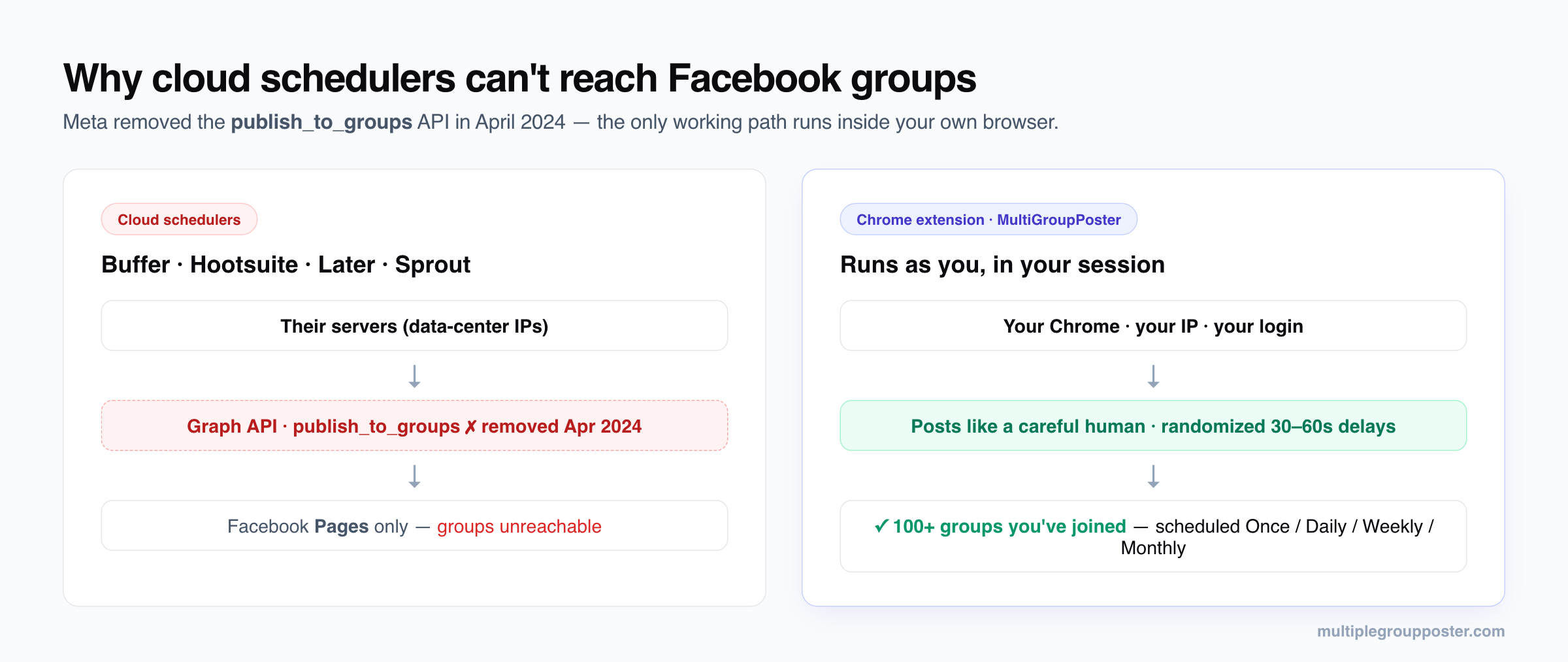
Diagram: cloud schedulers like Buffer and Hootsuite lost Facebook group access when Meta removed the publish_to_groups API in April 2024, while a Chrome extension posts from your own browser session and schedules to 100+ joined groups
Why group scheduling only works from your own browser: Meta removed the cloud path (publish_to_groups) in April 2024.

Why Buffer & Hootsuite can't schedule to groups

Until April 2024, Facebook offered a publish_to_groups API permission for apps installed by group admins. Meta announced its deprecation in January 2024 with Graph API v19.0 and removed it on April 22, 2024. Since then, no cloud scheduler can publish to a Facebook group — including groups you administer — and the API never covered groups you merely joined.

That leaves exactly one working architecture for group scheduling: software that runs inside your own logged-in browser session and posts the way you would, on a timer. That's what a Chrome-extension scheduler does. (Full background in our guide to scheduling posts to joined groups.)

How group scheduling works in MultiGroupPoster

  1. Compose once. Write your post in the editor, attach images or video, and add Spintax variations ({Hi|Hey|Hello}) so each group receives a unique version.
  2. Pick the groups. The extension auto-imports every group you're a member of. Select a saved list ("Real Estate — Florida") or hand-pick groups for this campaign.
  3. Set the schedule. Choose Once, Daily, Weekly, or Monthly, set the time, and set the pacing (randomized 30–60s delays by default, plus a daily cap).
  4. Let it run. At the scheduled time — with Chrome running — the extension publishes group by group, pacing itself like a careful human. The Queue tab shows live status; pause, edit, or delete any scheduled campaign there.

Schedule types

ScheduleWhat it doesTypical use
Run nowPublishes immediately with safe pacingOne-off announcements
OncePublishes at a specific date and timeLaunches, events, listings going live
DailyRepeats every day at your chosen timeMarketplace re-posts, job feeds
WeeklyRepeats on the weekdays you pickPromo days that match group rules
MonthlyRepeats on a day of the monthNewsletters, monthly offers

Many groups have "promo day" rules (e.g. self-promotion allowed only on Fridays). A weekly schedule per group list is the clean way to respect those rules at scale — here's exactly how.

The promo-day playbook: schedules that respect group rules

The most common reason group posts get removed isn't automation — it's posting promo content on the wrong day. Admins pin the rules; almost nobody reads them. Scheduling turns this from a memory problem into a one-time setup:

  1. Audit once. Skim each group's rules (the pinned post or the About tab) and note its promo policy: "any day", "Fridays only", "Tue/Thu threads", or "no promo".
  2. Tag lists by promo day, not by topic. Instead of one "Buy & Sell" list, create "Promo — any day", "Promo — Fridays", "Promo — Tue/Thu". A group can live in a topic list and a promo-day list.
  3. One Weekly schedule per promo-day list. The "Fridays" list gets a Weekly schedule on Friday; the "Tue/Thu" list gets one on Tuesday and Thursday. Set it once — it holds forever.
  4. Stagger the start times. If three schedules all fire at 9:00, your account posts in one burst across many groups — exactly the velocity pattern to avoid. Use 8:45 / 9:30 / 10:15.
  5. "No promo" groups still get value posts. Schedule non-promotional content (tips, market updates) to those — that's what keeps you welcome there, and it's where engagement tactics compound.
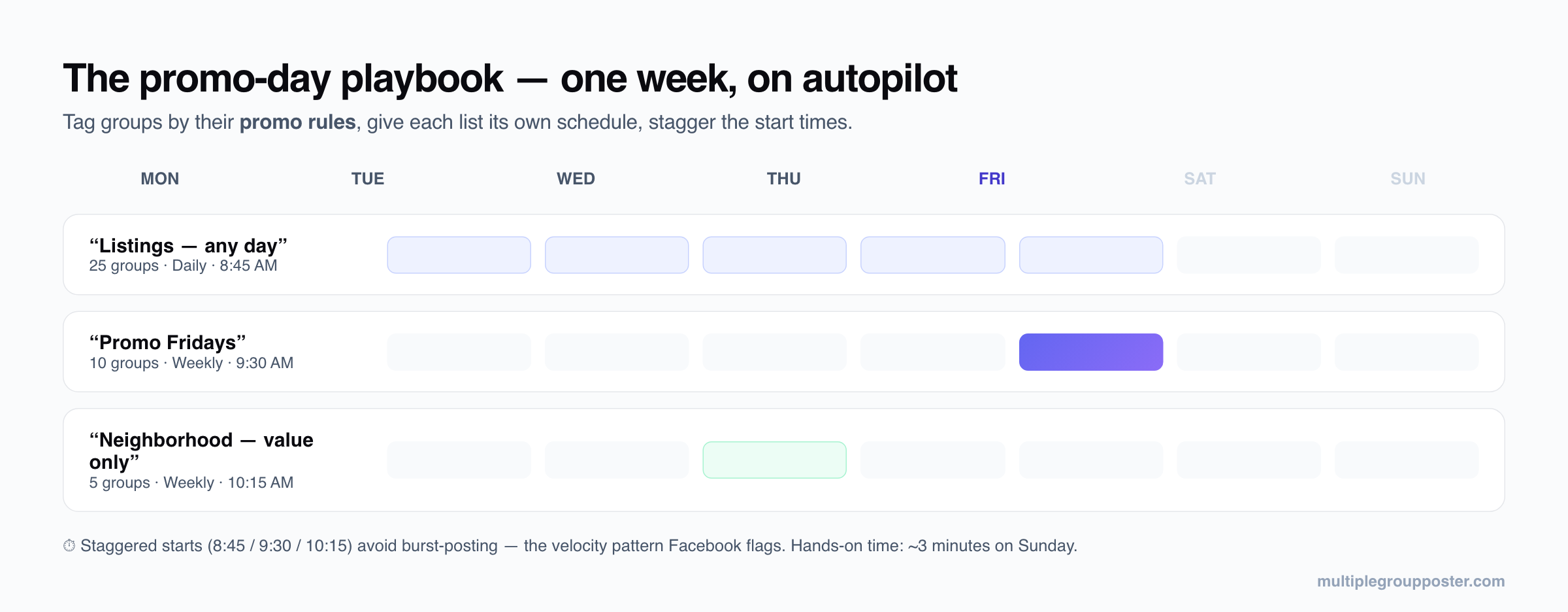
Example weekly Facebook group posting schedule: a 25-group listings list posts daily at 8:45 AM, a 10-group promo list posts Fridays at 9:30 AM, and a 5-group value-only list posts Wednesdays at 10:15 AM — start times staggered to avoid burst posting
Three lists, three schedules, staggered start times — the whole week runs itself.

A worked example: a real-estate agent's week

Say you're an agent in 40 groups: 25 allow listings any day, 10 are Friday-promo groups, 5 are no-promo neighborhood groups. The setup that runs itself:

ScheduleListTimeContent
Daily"Listings — any day" (25 groups)8:45 AMActive listing of the day, 3+ Spintax variants, photos attached
Weekly · Fri"Promo Fridays" (10 groups)9:30 AMWeekly featured listing + open-house slot
Weekly · Wed"Neighborhood — value only" (5 groups)10:15 AMMarket stat or local tip — no listing link

Total hands-on time: a few minutes on Sunday composing the week's variants. The runs themselves take ~20–35 minutes each in the background at safe 30–60s delays — while Chrome is open and you're answering email. Per-group results land in the Queue tab, and pending-approval groups are marked so you know which admins to nudge.

Safe pacing for scheduled posts

A schedule doesn't change the safety math — it enforces it. The same baseline applies as for manual campaigns:

Full reasoning and the flag-pattern table are in the safe settings guide and the State of Facebook Group Posting 2026 report.

Troubleshooting scheduled posts

Scheduling to Pages vs groups

If you only need to schedule to Facebook Pages you own, you don't need any third-party tool: Meta Business Suite does it free, natively, and cross-posts to Instagram. The gap is groups — and that's the gap this extension fills. The honest stack for most marketers is Meta Business Suite for Pages + MultiGroupPoster for groups. For the full tool landscape, see 8 Facebook post scheduler apps compared.
The actual tool

Everything you need to post to Facebook groups — safely.

Real screens from the extension. No mockups, no stock photos — this is exactly what you'll use.

One-click bulk posting

Write it once. Post to 100+ groups.

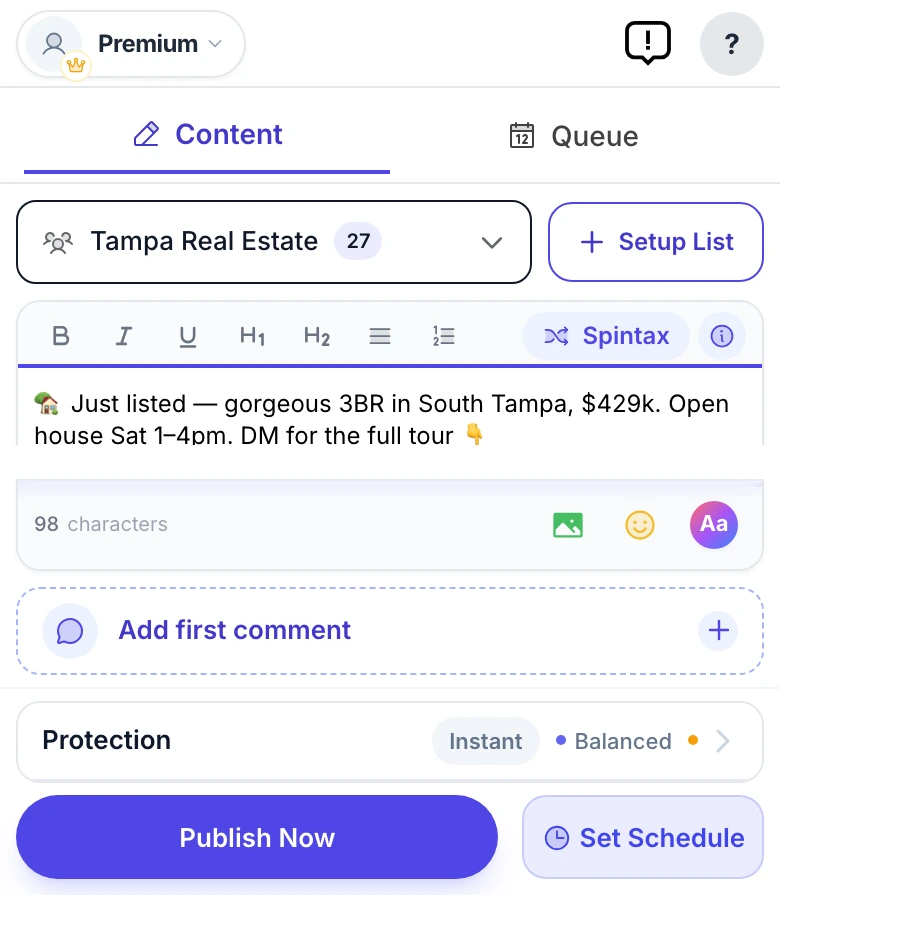
Stop copy-pasting the same post 50 times. Compose once, pick a saved group bundle, and MultiGroupPoster delivers it to every Facebook group on your list — one clean, native post at a time.

  • Reusable group bundles you set up once
  • Text, photos, video, emoji, link previews & color posts
  • Watch every group go out, live, with per-group results
MultiGroupPoster main screen (real extension popup) — composing a Facebook post with the Spintax, first-comment, color, and Protection controls, ready to publish to every group
Unique every time · Spintax

Every group sees a different version.

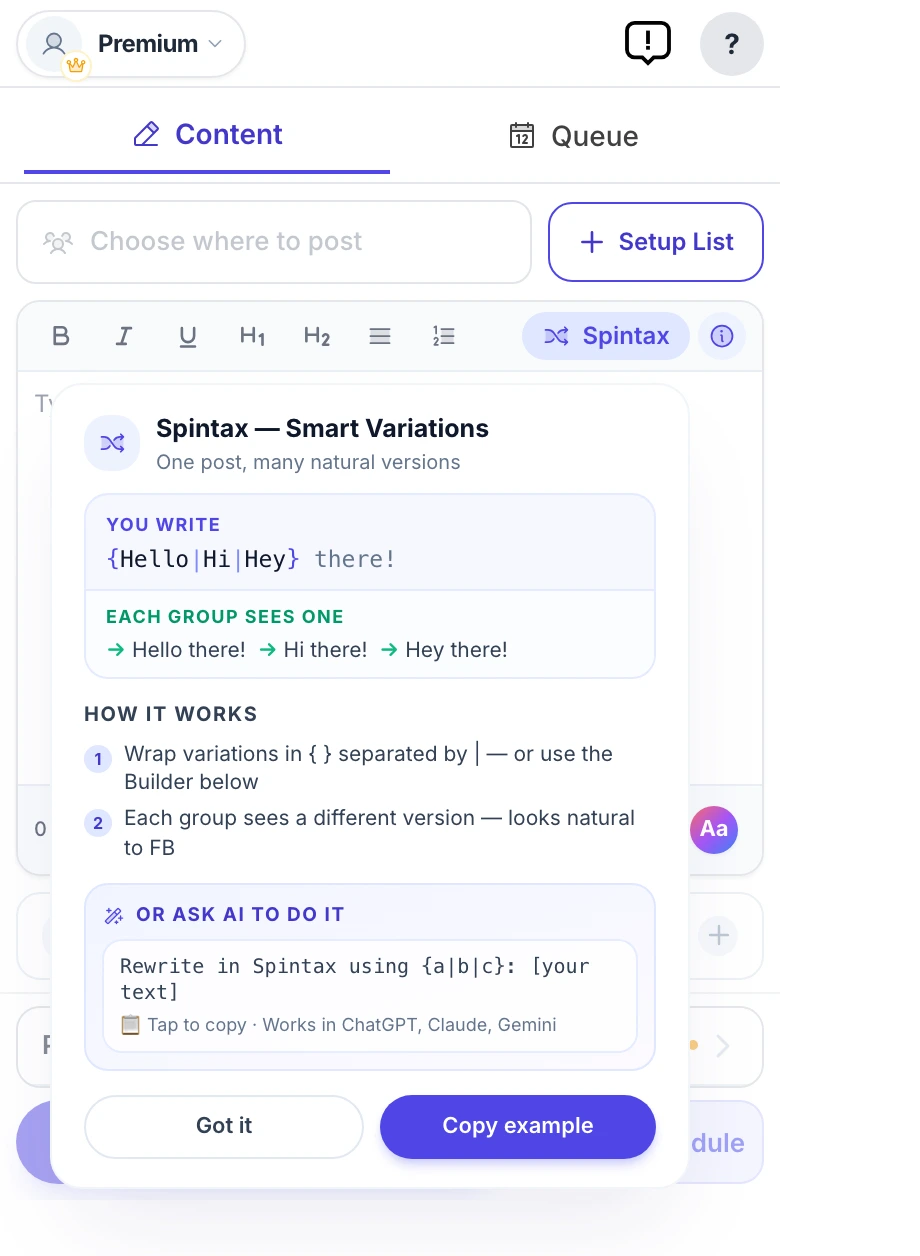
Facebook flags identical text pasted across groups as spam. Spintax rewrites your wording on the fly — {Hi|Hey|Hello} becomes a fresh variation for every group — so you post at scale and stay under the duplicate-content radar.

  • No two groups get the same post — automatically
  • Fewer spam flags, better reach per group
  • Paste ChatGPT or Claude variations straight in
MultiGroupPoster Spintax variation builder generating a unique version of a Facebook post for each group, with a live preview — avoids duplicate-content spam flags
Account-safe by design

Pacing that keeps you off Facebook's radar.

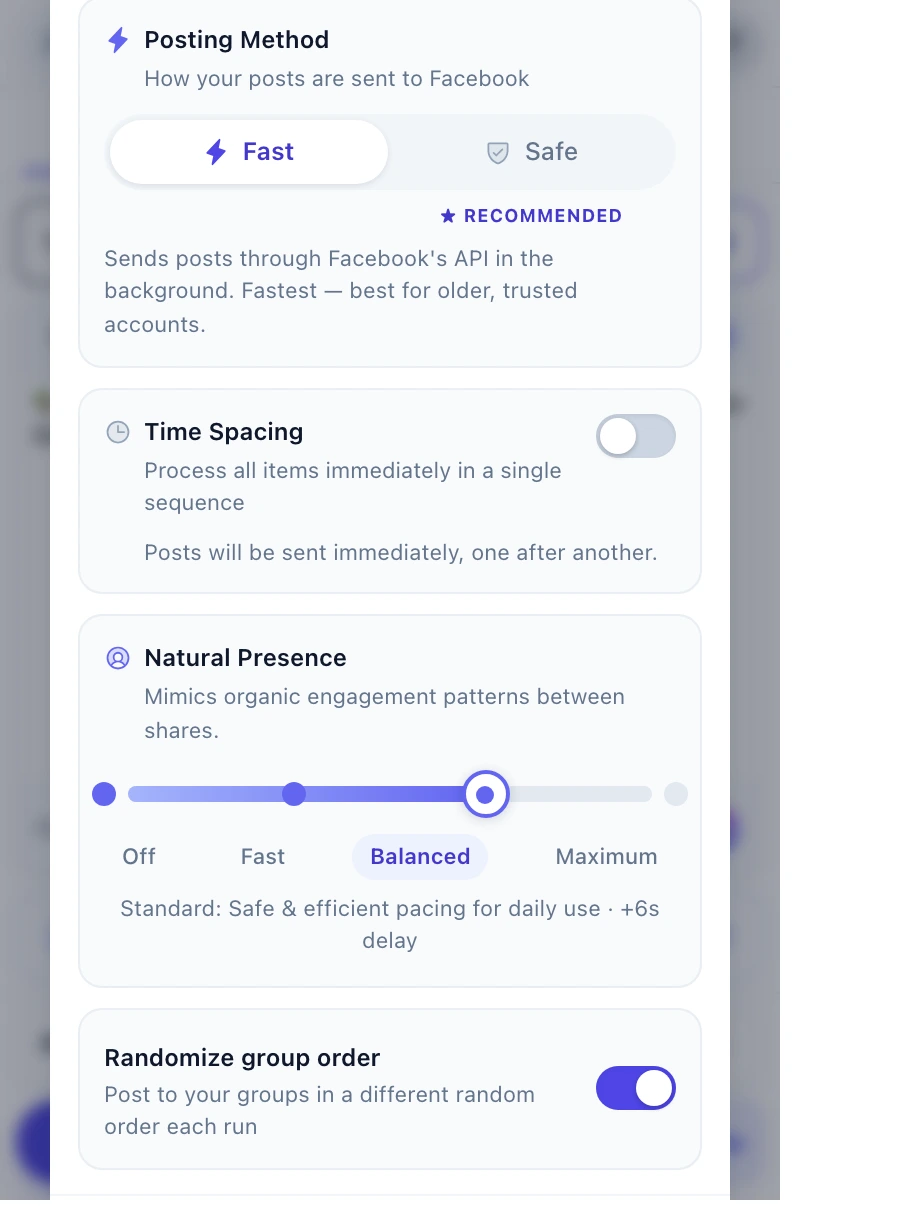
Blasting 50 posts in 50 seconds is how accounts get restricted. Time Spacing drips your posts out in natural rounds, and Natural Presence adds human-like browsing between them — so your activity looks like a person, not a bot.

  • Time Spacing — gradual rounds with randomized pauses
  • Natural Presence — four levels of human-like activity
  • 200-a-day safety floor + strike monitor with auto-cooldowns
MultiGroupPoster Protection — Time Spacing between posting rounds plus a four-level Natural Presence slider that mimics organic Facebook activity to protect your account from bans
Set it and forget it

Schedule once. It runs on autopilot.

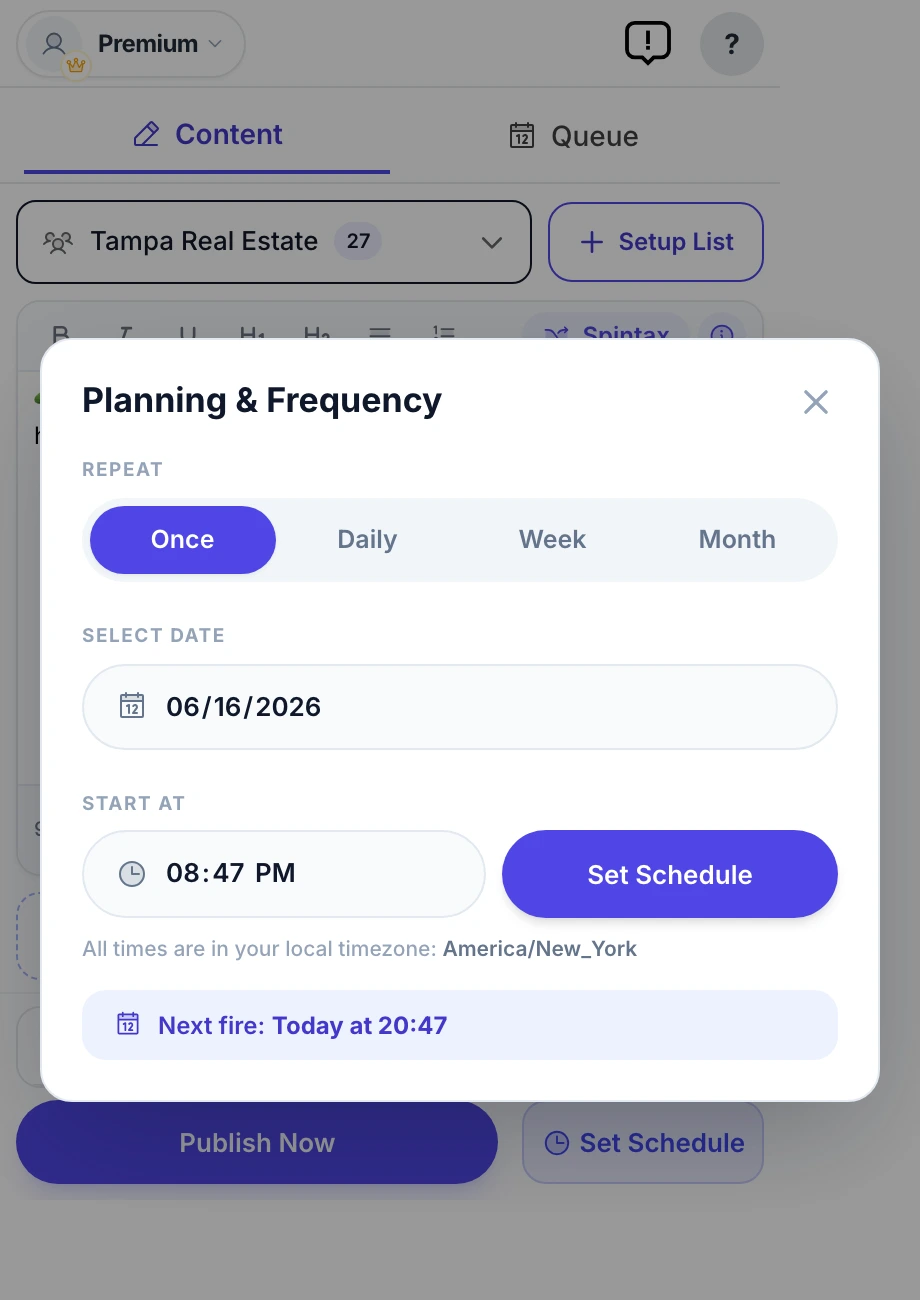
Queue your posts for the perfect moment — once, daily, weekly, or monthly. MultiGroupPoster fires them on schedule and shows you exactly what landed in every group.

  • Once / Daily / Weekly / Monthly frequencies
  • Per-group results you can open on Facebook
  • Pause, edit, or reorder the whole queue anytime
MultiGroupPoster Planning & Frequency scheduler set to auto-post to Facebook groups on a recurring weekly schedule
Build lists in seconds

Pull all your groups straight from Facebook.

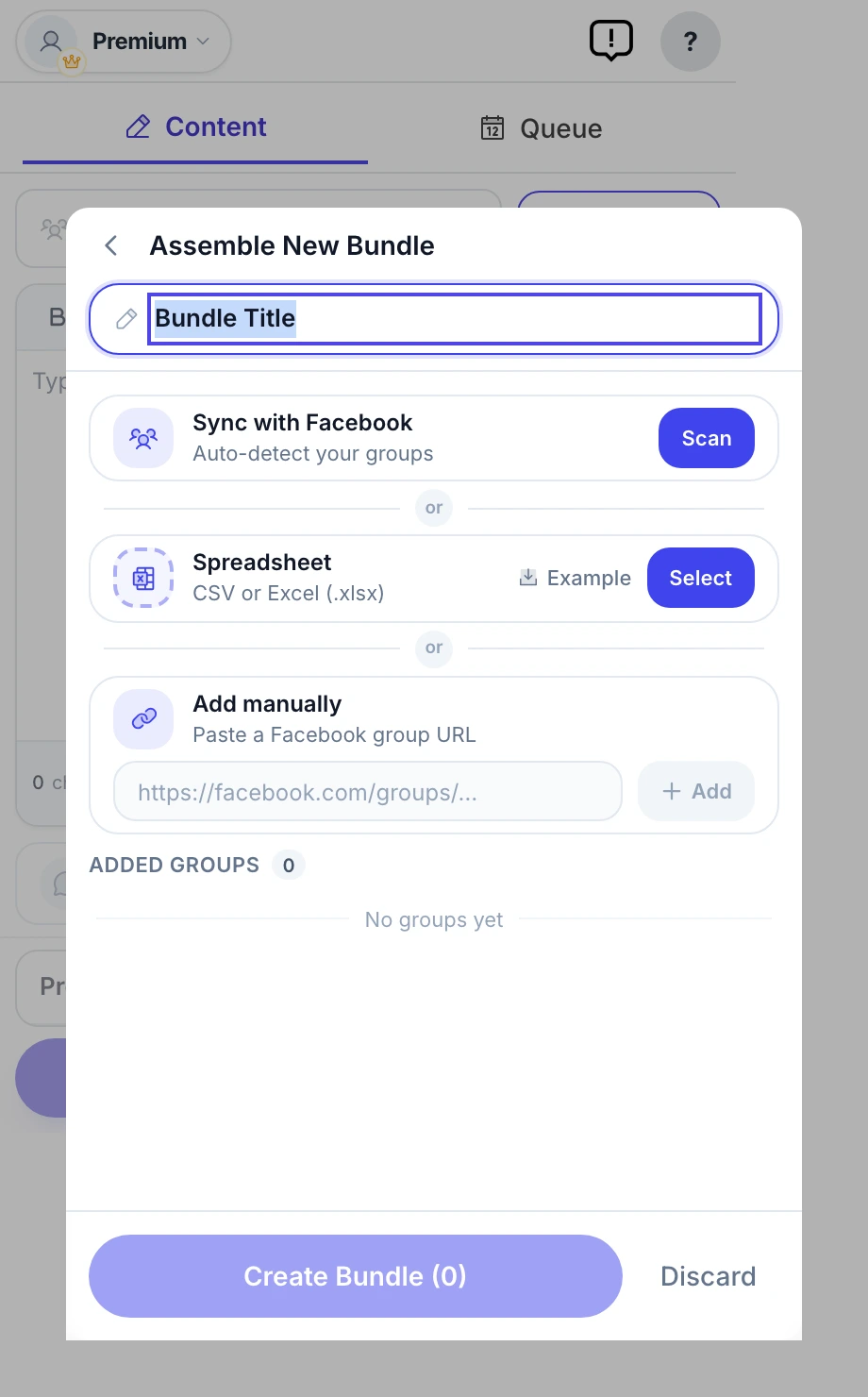
No manual copy-pasting of group URLs. Sync scans your Facebook account and imports every group you're a member of — then save targeted bundles you reuse for each campaign.

  • One-click sync from your own Facebook account
  • Or import a CSV / add group URLs manually
  • Save reusable bundles per niche or campaign
MultiGroupPoster Assemble Bundle screen — sync Facebook groups automatically, import a spreadsheet, or add group URLs by hand to build a reusable posting list

Auto first comment

Drop your link in the first comment of every post — the safe spot Facebook rewards, not penalizes.

Color background posts

Eye-catching text-on-gradient posts that stop the scroll — no image required.

Post as a Page

Switch between your personal profile and any Facebook Page you manage — per campaign.

Photos, video & emoji

Attach up to 10 images or a video per post, plus a 90+ emoji picker.

Reusable templates

Save your winning posts and reload them into a new campaign with one click.

Scheduling queue

Every scheduled post in one place, sorted by next run — pause the whole queue anytime.

Per-group results

See success / pending-approval / failed for each group, and open any live post on Facebook.

One-click diagnostics

A built-in self-test and downloadable report — no DevTools needed if anything looks off.

Pricing

$8.99 per month for unlimited. Or 6 free posts to try.

Start free. Upgrade when you need unlimited posting. Cancel in one click.

Free
$0

Try it free — 6 posts, one-time. No credit card.

  • 6 posts to try (one-time)
  • Manual scheduling
  • Basic group lists
  • Community support
Add to Chrome — Free
→ Most users start here
Pro Monthly
$8.99 /month

For solo marketers who post most days.

  • Unlimited posting
  • Schedule + Spintax
  • Background colors
  • Rotating image sets
  • Auto first comment
  • Advanced organization
  • Priority email support
Start Pro
$8.99/mo replaces $400/mo VA · 7 hours of your time · Several scheduler subscriptions

7-day money-back guarantee. Cancel anytime. No questions asked.
All plans run in your browser. Your Facebook credentials never leave your computer.

Frequently asked questions

Can I schedule posts to Facebook groups I joined (not just admin)?

Yes — with a Chrome extension that posts from your own logged-in session, like MultiGroupPoster. Cloud schedulers (Buffer, Hootsuite, Later) cannot: Meta removed the publish_to_groups API in April 2024, and even before that it never covered groups you merely joined.

Does my computer need to be on at the scheduled time?

Yes — Chrome needs to be running, because scheduled posts publish from your own browser session. That requirement is exactly what keeps scheduled posting account-safe: every post comes from your real IP, your real session, and human-like pacing, not a data-center server.

What schedule types does MultiGroupPoster support?

Run now, Once (a specific date and time), Daily, Weekly (pick weekdays), and Monthly. Each scheduled campaign keeps its own group list, Spintax variations, and pacing settings, and you can pause, edit, or delete it from the Queue tab.

Can Buffer or Hootsuite schedule posts to Facebook groups?

No. They schedule to Facebook Pages you own. Group posting via the official API ended for third-party apps in April 2024 (Graph API v19.0 deprecation), so no cloud scheduler can publish to groups — including groups you admin.

Is scheduled auto-posting safe for my Facebook account?

The same pacing rules apply as manual campaigns: 50–100 posts/day for established accounts, randomized 30–60 second delays, Spintax variations on. The scheduler enforces these defaults automatically, which is safer than rushing a manual batch.

How much does the scheduler cost?

Scheduling is included in every plan. The Free trial gives you 6 posts (one-time) to test the full flow, then Pro is $8.99/month or $69.99/year for unlimited posting.

5.0 · 450+ reviews 8,000+ marketers since 2022 Read them on the Chrome Web Store →

Schedule your first group campaign today.

Set it up once — the extension handles the publishing, the pacing, and the variations. Free for 6 posts to try · Pro from $8.99/mo.

Add to Chrome — Try Free
Free trial · No credit card
Add to Chrome